
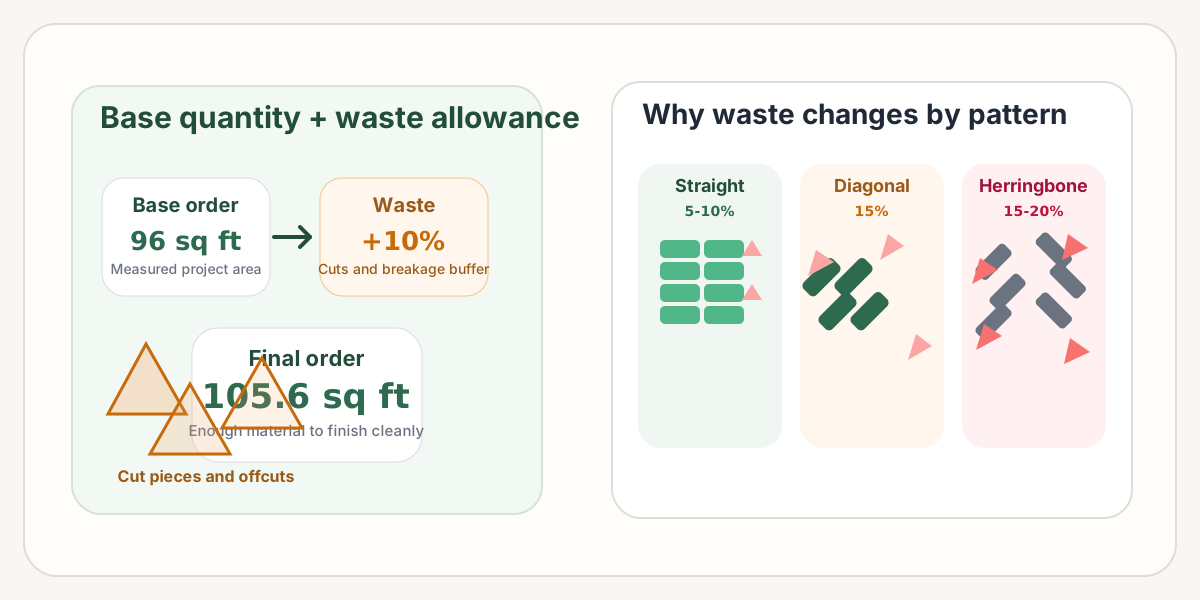
What Is a Waste Factor?
A waste factor is the extra percentage of material you add to the base quantity so the project can absorb cutting loss, damaged pieces, layout adjustments, and a small repair reserve.
In practice, it is the overage that keeps an install moving when edge cuts start piling up or a few pavers arrive chipped. Without that buffer, a project that looks fully measured on paper can still come up short on site.
Total pavers to order = Base quantity x (1 + Waste %)
Why You Always Need Extra Pavers
-
Cut loss Edge conditions, corners, steps, drains, and borders create cut pieces that often cannot be reused elsewhere.
-
Breakage during handling A few units can crack during shipping, unloading, cutting, or on-site movement even when the material quality is good.
-
Future repairs Keeping a few matching pavers makes later spot repairs much easier and avoids batch or color mismatch problems.
-
Pattern complexity Straight layouts waste less. Diagonal and herringbone layouts produce more unusable offcuts at the perimeter.
-
Curves and irregular edges The more the border moves away from a clean rectangle, the more trimming and waste the install will generate.
The same paver can waste very different amounts depending on layout direction. A clean straight install might stay near 8% to 10%, while a 45-degree layout can move closer to 15%.
What Drives the Waste Amount?
Expected installation loss
Waste rises when the install requires more trimming, tighter fitting, or more perimeter adjustment. Tight joints and detailed borders leave less room to absorb variation.
Damaged or low-quality material
Not every delivered unit ends up in the finished field. Chips, cracks, inconsistent color, or weak pieces should be filtered out before they reach the visible surface.
Layout pattern complexity
Straight patterns usually cut the least. Diagonal layouts create more triangular offcuts, and herringbone often drives the highest overage because almost every edge becomes an angle cut.
Recommended Waste Percentages by Scenario
These ranges are practical planning defaults. When the site has mixed obstacles, curves, or decorative borders, move toward the higher end of the range rather than the lower end.
| Scenario | Recommended waste | Why it changes |
|---|---|---|
| Simple rectangle, straight layout | 5-10% | Lowest cut loss and the easiest layout to keep efficient |
| Rectangle with some cuts | 10% | Safe default for most patios and walkways |
| Diagonal 45-degree layout | 15% | All perimeter edges create angle cuts and more offcuts |
| Herringbone pattern | 15-20% | Usually the heaviest cut pattern for modular pavers |
| Curved or arced edges | 10-15%+ | Curves create repeated trim pieces that rarely reuse cleanly |
| Irregular polygon layout | 15%+ | More corners and shape changes usually mean more waste |
| Border-heavy or decorative detail | 15%+ | Transitions, banding, and accents create extra trimming |
| Tight-joint natural stone work | 30-40% | Irregular shapes and selective fitting create much higher loss |
When the layout is close to a full pallet threshold, round up. A few extra pavers are cheaper than pausing mid-project and trying to match a discontinued color or a different batch.
How to Calculate Waste Step by Step
Calculate your base area
Base area (sq ft) = Length (ft) x Width (ft)
Example: 12 ft x 8 ft = 96 sq ft.
Choose the waste percentage
Use the scenario table above. A straight layout might use 10%, while a herringbone layout may need 20%.
Calculate the waste amount
Waste amount = Base area x Waste %
96 sq ft x 0.10 = 9.6 sq ft of extra material.
Calculate total area to order
Total area to order = Base area + Waste amount
96 + 9.6 = 105.6 sq ft.
Convert to number of pavers
Pavers to order = Total area / Paver area
Using a 4 x 8 paver at 0.22 sq ft each, 105.6 / 0.22 is about 480 pavers.
Worked Example
| Project area | 96 sq ft |
|---|---|
| Waste factor | 10% |
| Waste amount | 9.6 sq ft |
| Total area to order | 105.6 sq ft |
| Paver size | 4 x 8 in (0.22 sq ft each) |
| Final order quantity | 480 pavers |
Use our free Paver Cost Calculator. It applies waste automatically based on your layout pattern and updates paver totals instantly.
Waste Factor by Pattern Type
Straight / Running Bond
This is usually the most efficient pattern. Most waste appears only at the perimeter, which keeps the overage relatively low on clean rectangular layouts.
Diagonal
Turning the field 45 degrees increases cut loss at nearly every edge. Even with the same paver size, diagonal work usually needs noticeably more material than straight installs.
Herringbone
Herringbone gives excellent interlock, but it is usually the most waste-heavy modular pattern. Contractors often lean toward the high end of the range, especially for edges and borders.
Waste for Irregular & Curved Areas
Waste rises quickly when the footprint stops behaving like a simple rectangle. L-shapes, T-shapes, arcs, and border details all create more perimeter trimming and more unique offcuts.
Use a typical planning range around 10%.
More corners and transitions often move the waste allowance higher.
Arc cuts produce more pieces that do not fit anywhere else.
Mixed directions and tight transitions usually justify the highest common range.
Damaged & Poor-Quality Pavers
Even a well-packed order can contain some unusable units. A few pieces may arrive chipped, crack during unloading, or break while being cut into smaller edge pieces.
This is one reason installers avoid ordering exactly the measured quantity. If the material itself is inconsistent, natural stone-like, or visually selective, the waste factor should move up instead of down.
Never assume every unit in a delivery will be perfect. Even a good batch can include visible chips, cracks, or color outliers that are better kept for hidden cuts or rejected entirely.
As a baseline, most projects should still hold at least a 5% damage buffer even when the layout is simple and rectangular.
Pro Tips from Contractors
-
Round up to full pallets when possible
Pavers are often sold by pallet or cube. Rounding up can be more practical than risking a small shortage.
-
Check the supplier return policy
Some suppliers will take back unopened pallets, which lets you buy conservatively without trapping all of the extra material on site.
-
Keep a few extras for future repairs
Saving 5 to 10 matching pavers is far better than trying to source the same color years later.
-
Remember that joint width changes field fitting
Tighter joints often force more exact trimming, which can push waste upward on detailed installs.
-
Do a small mock-up first
Testing a small area can reveal the real cutting pattern and help you confirm whether the default waste assumption is too low.
-
Separate diagonal zones from straight zones
If one section uses a different pattern, calculate its waste independently and then combine the material totals.
FAQ
It is the extra percentage of material added to the base quantity to cover cuts, breakage, damaged units, and a small reserve.
Straight layouts often use 5% to 10%. Diagonal and herringbone layouts often use 15% to 20%, especially when the project has many cuts.
Herringbone usually creates more angled edge cuts than straight layouts, which means more offcuts cannot be reused elsewhere in the field.
Yes. Curved edges usually need more trimming than straight edges, so a 15% or higher waste factor is common.
The project can stall while you reorder, and the replacement material may not match the original batch perfectly.
Sometimes. Return policies vary by supplier, and many require pallets to stay unopened and undamaged.
Yes. Tighter joints generally require more precise fitting and can push waste upward on detailed layouts.